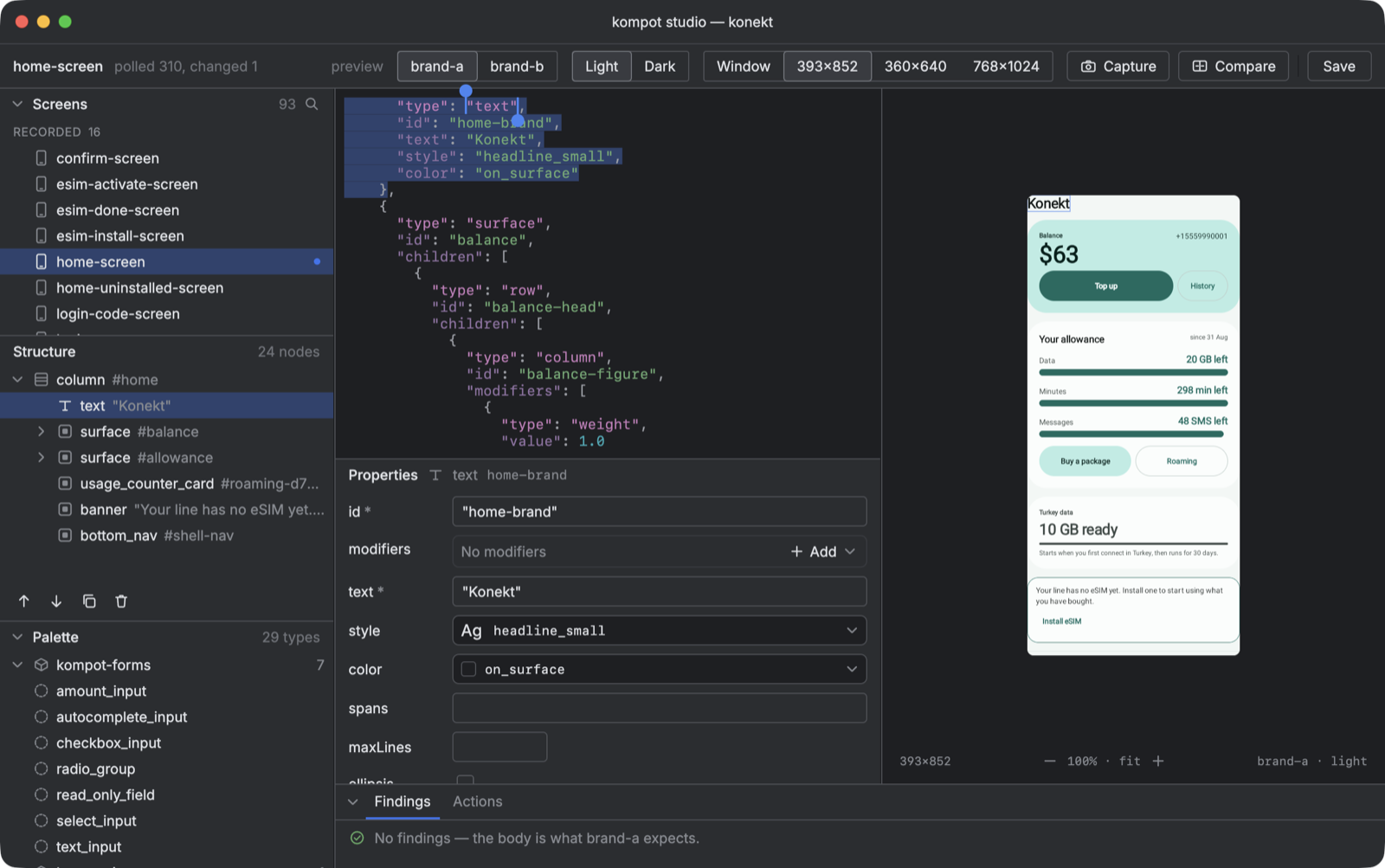
kompot-studio is a desktop editor for the screens a backend-driven UI server sends. The server side of kompot writes a tree of components blind: the JSON leaves as text, and the first time anybody sees it drawn is on a phone. The studio puts the text and the drawing side by side — the same renderers, the same brand frame, the same design system the client ships — and says what is wrong with the body before a client ever receives it.
Why it exists
A backend-driven screen has two readers with different opinions: a JSON Schema that says which shapes are allowed, and a client that says which of them it can draw. Neither is enough alone. The schema passes a body that names a component this build does not ship, and the client draws a placeholder for it without complaint — that is the protocol working as designed, and it is exactly the thing somebody wants to see before shipping the screen. A validator answers the first question; a running app answers the second, one deployment later. The studio answers both at once, against the build that will do the drawing.
What it does
- Opens a body from a file, a directory of recordings, or an HTTP source polled by ETag.
- Draws it inside the consumer's frame: brand, light or dark, a device size, a form state.
- Checks it in layers — syntax, the build's profile schema, the rules the schema cannot express, the vocabulary of words and design tokens this build answers for, and what the render reported about itself — and lists the findings with the layer that raised each.
- Edits the body: drag a type from the palette into a slot, move a node by mouse or by button, change a property in an inspector generated from the schema, pick a design token from the build's dictionary.
- Captures the frame and compares it with a golden through viddik, when viddik is on the classpath.
- Prints a draft of the server side as Kotlin DSL.
Install
The studio is a library the consumer's build launches: the renderers, the brand frame and the recorded screens live there. A Gradle plugin adds the task, and a KompotStudioConfigProvider in the source set says what to open it with.
// settings.gradle.kts — Jewel's icons live only in the IntelliJ repository
maven("https://reposilite.kotlin.website/snapshots")
maven("https://www.jetbrains.com/intellij-repository/releases") {
    content { includeGroup("com.jetbrains.intellij.platform") }
}
// build.gradle.kts of the module with the renderers
plugins {
    id("io.github.youndie.kompot.studio") version "0.36.2.125"
}

kompotStudio {
    target = "jvm"
    compilation = "test" // where the frame, the recordings and the goldens are
}
How it looks
// registered in META-INF/services/io.github.youndie.kompot.studio.KompotStudioConfigProvider
class StudioProvider : KompotStudioConfigProvider {
    override val title get() = "kompot studio — my app"

    override fun studioConfig() = KompotStudioConfig(
        registry = myRegistry(),
        frame = { brand, dark, content -> MyBrandFrame(brand, dark) { content() } },
        brands = listOf("brand-a", "brand-b"),
        schemas = mySpec.schemas() + (KompotProtocol.PROFILE_FILE_NAME to mySpec.profile()),
        sources = listOf(ScreenSource.Directory(recordingsDir, name = "recorded")),
        samples = showcaseComponents().map { wireTypeOf(it) to it },
    )
}
./gradlew :client:kompotStudio
A brand is a string here on purpose: the toolkit knows nothing brand-specific, so the consumer hands over the list of names, a frame that understands them, and a rule for naming goldens. Another consumer's "brands" are regions or tenants, and the studio does not care.
The body is the source of truth
There is one state, and it is the text. The tree, the palette, the inspector and the preview all read the same JSON and all write back into it: moving a node in the tree is a splice in the text, a property changed in the inspector is a property changed in the text, and the editor's caret lands on the node the tree selected. Nothing is kept beside the body that would have to be kept in agreement with it.
The preview follows with a short debounce, and a body that no longer parses does not take the picture down: the editor tints the failing line and names the offset, while the tree and the preview keep showing the last body that parsed. A body that parses but cannot be decoded by the client — a string where a number belongs — becomes a finding on the render layer rather than a dead window.
Findings, by layer
A finding names the node it is about in the validator's path notation, and the tree carries the same notation, so clicking a finding selects the node without either side parsing the other. Errors come first: the body would not decode, or the profile forbids it. Then warnings: a component the build cannot draw and degraded to a placeholder, a token nobody defined. Then drafts — a node just added from the palette with its required fields still empty, grouped into one line per node rather than one per field.
The render layer is the one none of the others can replace. The client reports every component it could not draw and every action it could not act on through kompot's degradation sink, and the studio folds those reports into the same list, with the same shape, as the schema's.
Limitations
- Desktop only, and on a JetBrains Runtime 25: the window is drawn with Jewel, whose decorated window refuses any other JVM. The plugin provisions the runtime through a toolchain; a jar launched by hand on another JVM opens undecorated and says so.
- The trackpad pinch on macOS reaches the window through Apple's gesture API in a package
java.desktopdoes not export; the plugin passes--add-exportsfor it, a hand launch must. - Compose's accessibility is switched off in the studio by default. Compose Desktop 1.11 takes the window down when a focused node is removed under an assistive client, and an editor removes nodes all day;
-Dcompose.accessibility.enable=trueturns it back on. - A golden is one file per screen, brand and theme, at 393×852. Capture and Compare take the frame at that size whatever the preview shows; there is no golden per device.
- The Kotlin DSL export is a draft with a marker on every name it had to guess. It is a starting point for the server side, not something to paste and ship.
- Verified by hand on one consumer's build. The states a drag shows while it is in the air — the tinted target, the insertion line — were not: a synthetic gesture cannot be looked at mid-drag, so only the drop itself has been exercised.
Source: github.com/youndie/kompot